What Actually Happens When You Hit Enter After Typing a URL
Your CS professor gave you the 3-step answer: you type a URL, DNS finds the IP, the server sends back HTML. If you said that in a senior engineering interview, they'd politely move on and never call you back.
The real answer spans 15+ systems — caches, protocols, handshakes, load balancers, application servers, databases, and rendering engines — all completing in under 300 milliseconds. Understanding all of them is what separates engineers who can reason about production systems from engineers who just write code and hope it works.
Here's the full version. No hand-waving.
Why This Question Shows Up in Every Senior Interview
When an interviewer asks "what happens when you type a URL into a browser?", they're not testing your memorization skills. They're probing whether you understand how distributed systems compose. Every component in that chain is a system design topic in its own right: DNS (distributed key-value store), TCP (reliable transport), TLS (public-key cryptography), load balancers (routing and availability), databases (persistence and consistency), rendering (server vs client architecture).
Your answer to this question maps directly to your ceiling as a backend engineer. Let's go deep.
Step 1: You Press Enter — The Browser Checks Its Own Cache First
Before any network request happens, the browser checks whether it already has the IP address for this domain stored locally.
Browser DNS cache → OS DNS cache → Router DNS cache → ISP resolver
Your browser maintains its own short-lived DNS cache (Chrome's is at chrome://net-internals/#dns). Your operating system has one too. Your home router often caches DNS responses. If any of these have a valid, non-expired entry for github.com, you skip Step 2 entirely.
This is why DNS propagation after changing your domain's DNS records takes time to "spread" globally — every cache in this chain has a TTL (time-to-live) value, and old entries survive until they expire.
Step 2: DNS Resolution — The Internet's Distributed Phone Book
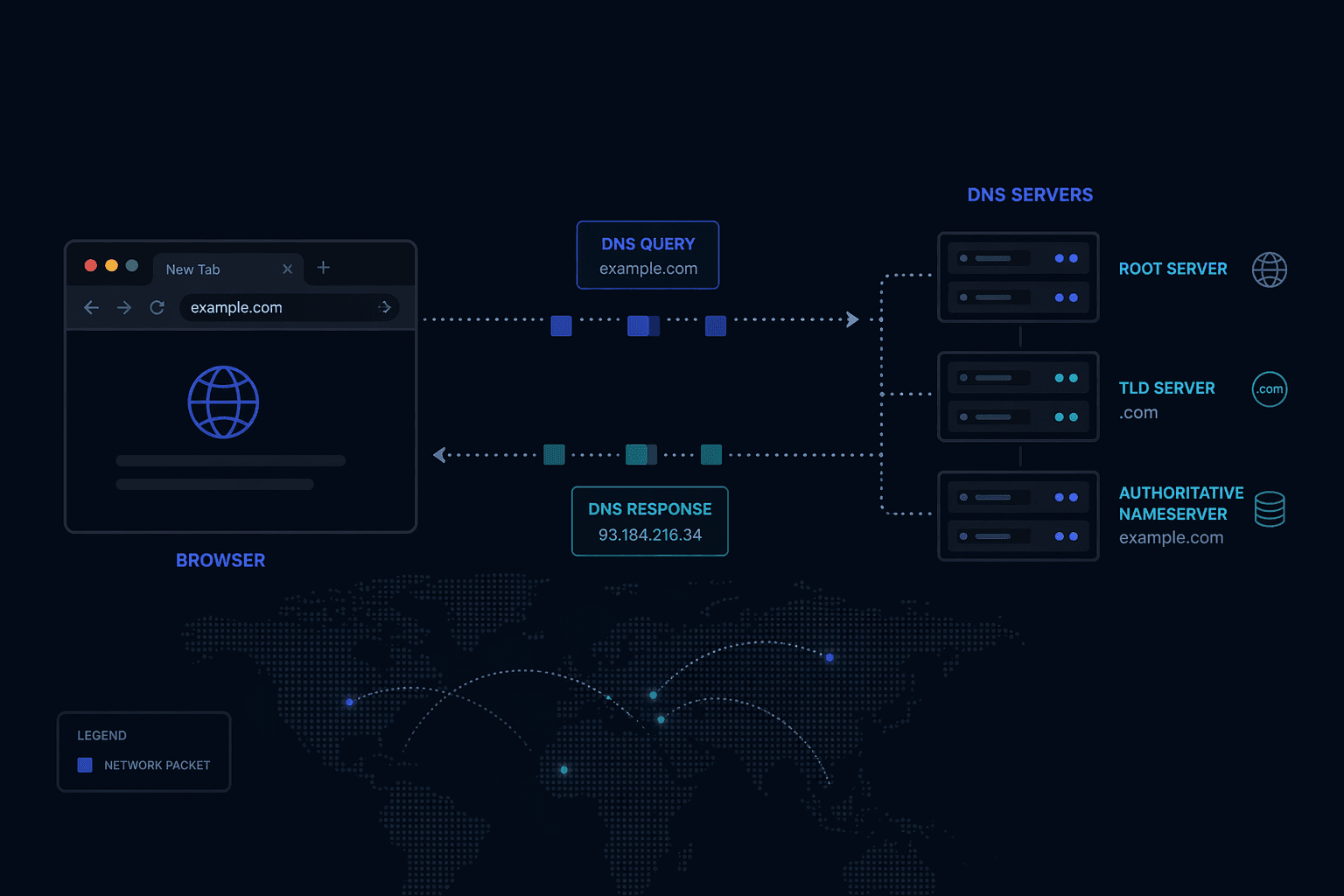
If no cache has the answer, your OS sends a query to a recursive DNS resolver — usually your ISP's DNS server, or a public one like 8.8.8.8 (Google) or 1.1.1.1 (Cloudflare).
The recursive resolver does the actual legwork through a hierarchy of DNS servers:
1. Root nameservers — There are 13 sets of root nameservers worldwide (operated by organizations like ICANN, Verisign, and NASA). They don't know where github.com is, but they know which nameservers are authoritative for .com domains.
2. TLD nameservers — The .com TLD nameserver knows which nameservers are authoritative for github.com specifically.
3. Authoritative nameserver — GitHub's own nameservers finally return the actual IP address: 140.82.121.3.
The recursive resolver caches this response (respecting the TTL) and returns it to your OS, which caches it too. Future lookups for github.com skip the full chain.
Your OS → Recursive Resolver → Root NS (.com?) → TLD NS (github.com?) → Authoritative NS → IP: 140.82.121.3
Why TTL strategy matters: Low TTL (60s) means fast propagation when you change DNS records but more DNS queries under load. High TTL (86400s = 24 hours) reduces DNS load but means a bad IP can persist for a day. Production systems tune this based on change frequency and traffic volume.
Step 3: TCP Handshake — Establishing a Reliable Connection
Now your browser has the IP address. It needs to open a TCP connection to the server on port 443 (HTTPS).
TCP requires a 3-way handshake before any data flows. This guarantees both sides are alive and ready:
Client → Server:  SYN       (I want to connect, here's my sequence number)
Server → Client:  SYN-ACK   (Got it, here's mine)
Client → Server:  ACK       (Got yours, connection open)
This takes one full round trip (RTT). On a connection with 50ms latency, that's 50ms just to say hello — before a single byte of HTTP data moves.
Why this matters at scale: Every new TCP connection costs one RTT. HTTP/1.1 introduced persistent connections (keep-alive) to reuse connections across multiple requests. HTTP/2 added multiplexing so multiple requests travel over a single connection simultaneously. HTTP/3 (QUIC) eliminates the TCP handshake entirely for repeat connections. These aren't academic optimizations — they directly affect your Time to First Byte (TTFB) metric.
Step 4: TLS Handshake — Encrypting the Connection
For HTTPS (which is everything today), a TLS handshake runs on top of the TCP connection. TLS 1.3 (current standard) looks like this:
1. Client Hello — Your browser sends its TLS version, supported cipher suites, and a random value.
2. Server Hello — The server picks a cipher suite, sends its TLS certificate (containing its public key), and a random value.
3. Certificate validation — Your browser checks whether the certificate is signed by a trusted Certificate Authority (CA) whose root certificate is baked into your OS/browser. It also checks the certificate isn't expired and the domain matches.
4. Key exchange — Both sides use the exchanged random values and asymmetric cryptography (Diffie-Hellman in TLS 1.3) to independently compute the same symmetric session key — without ever sending that key over the wire.
5. Finished — Both sides confirm they've derived the same key. All subsequent traffic is encrypted with this symmetric key.
TLS 1.3 reduced this to one round trip (down from two in TLS 1.2). Session resumption (0-RTT) can eliminate the handshake entirely for returning visitors.
The key insight: Public-key cryptography establishes trust and negotiates a key. Symmetric encryption does the actual work because it's orders of magnitude faster. TLS uses both, for different jobs.
Step 5: The HTTP Request Leaves Your Browser
With TCP + TLS established, your browser sends an HTTP request:
GET /about HTTP/2
Host: github.com
Accept: text/html,application/xhtml+xml
Accept-Encoding: gzip, br
Accept-Language: en-US
Cookie: _gh_sess=abc123; user_session=xyz789
Cache-Control: no-cache
User-Agent: Mozilla/5.0 ...
Notice what's in here: the Host header (critical — one server can host thousands of domains), cookies (session state traveling with every request), compression preferences, and cache directives. The request body (for POST/PUT) would follow the headers.
Step 6: Load Balancer — Traffic Routing and High Availability
Your request doesn't go straight to an application server. It first hits a load balancer — a system whose job is to distribute incoming traffic across a pool of servers and route around failures.
Common routing algorithms:
| Algorithm | How It Works | Best For |
|---|---|---|
| Round Robin | Requests distributed in rotation | Stateless apps, similar request cost |
| Least Connections | Routes to server with fewest active connections | Variable-length requests |
| IP Hash | Same client IP → same server | Session stickiness (without sticky sessions middleware) |
| Weighted Round Robin | Heavier servers get more traffic | Mixed hardware capacity |
The load balancer also handles health checks — it periodically probes each backend server (GET /health) and removes unresponsive ones from the rotation. This is how your app stays up during deploys: old instances drain their connections while new ones come online.
Layer 4 vs Layer 7: L4 load balancers route based on TCP/IP headers alone (fast, no content inspection). L7 load balancers inspect HTTP content — they can route /api/* to your API servers and /static/* to a CDN origin, or do SSL termination before traffic reaches your app. Most modern setups (AWS ALB, nginx, Caddy) are L7.
Step 7: Web Server and Application Server — Two Jobs, Sometimes One Process
There's a distinction most tutorials skip: web server vs application server.
Web server (nginx, Apache, Caddy): Handles static files, SSL termination, compression, caching, and proxying to the app server. Extremely fast at serving files directly from disk. Does not execute application code.
Application server (Node.js/Express, Django, Rails, Spring): Runs your actual business logic. Handles routing, authentication, database calls, and response assembly. Slower per-request but where the work actually happens.
In production, nginx typically sits in front and handles:
- Static assets (JS, CSS, images) — served directly without touching your app
- Compression (
gzip/brotli) of responses - Rate limiting and basic DDoS mitigation
- TLS termination (takes load off your app)
- Reverse proxy of dynamic requests to your app
Your app server receives a clean HTTP request, runs through your middleware stack (auth, validation, logging), hits your route handler, and starts doing work.
Step 8: Database Query — Where Most Latency Lives
Your route handler calls the database. This is where most production performance problems originate.
// What your code looks like
const user = await db.query('SELECT * FROM users WHERE id = $1', [userId]);
What actually happens:
-
Connection pool checkout — Your app server maintains a pool of pre-established database connections (expensive to create). The query borrows one. If all connections are busy, the request waits. This is connection pool exhaustion — the silent killer at scale.
-
Query planning — The database parses your SQL, checks statistics about your data distribution, and decides on an execution plan.
EXPLAIN ANALYZEshows you this plan. An index scan is fast; a sequential scan on a 10M-row table is not. -
Execution — Reads pages from the buffer pool (in-memory cache). If the page isn't cached, it reads from disk (100x slower). A warm database serving a popular query is serving it entirely from memory.
-
Result serialization — Rows are serialized and sent back over the connection.
The N+1 query problem: ORMs make it easy to write code that issues one query to get a list of items, then N queries to get details for each item. 10 users = 11 queries. 10,000 users = 10,001 queries. Always check your ORM's query log in development.
Step 9: Response Assembly and Sending It Back
Your app server collects the data it needs, assembles the response, serializes it (JSON, HTML, or protobuf), and sends it through the reverse proxy chain back to your browser.
Key decisions that affect performance here:
Compression: nginx can gzip your response before sending. A 100KB JSON payload often compresses to 15KB. The tradeoff is CPU time vs bandwidth.
HTTP caching headers: Your server controls caching behavior with Cache-Control. Cache-Control: public, max-age=3600 lets CDNs and browsers cache the response for an hour. Cache-Control: no-store forces a fresh request every time. The right policy depends on how often your data changes.
Streaming vs buffering: For large responses, streaming lets the browser start processing before the full response arrives. Node.js streams, HTTP chunked transfer encoding, and server-sent events all use this pattern.
Step 10: Rendering — Server-Side vs Client-Side
The browser receives the response. What happens next depends on how your app is built.
Server-Side Rendering (SSR): Your app server generated complete HTML. The browser parses it, builds the DOM, downloads referenced CSS/JS, and renders. The user sees content quickly, but interactivity arrives when JavaScript loads and "hydrates" the page.
Client-Side Rendering (CSR): Your server sent a minimal HTML shell and a JavaScript bundle. The browser runs the JS, which makes additional API calls and builds the DOM dynamically. First paint is fast, content paint is slower.
Static Site Generation (SSG): HTML was generated at build time and cached on a CDN. No server computation at request time. Fastest possible TTFB — but only works for content that doesn't change per-user.
Modern frameworks (Next.js, Remix, SvelteKit) give you per-page granularity over this decision. A product listing page can be statically generated; a user dashboard needs SSR or CSR.
The Full Picture
[Browser] → DNS Cache Check
         ↓ (miss)
[DNS Resolver] → Root NS → TLD NS → Authoritative NS → IP Address
         ↓
[TCP 3-Way Handshake] — 1 RTT
         ↓
[TLS 1.3 Handshake] — 1 RTT
         ↓
[HTTP Request] → [Load Balancer] → [nginx] → [App Server]
                                                    ↓
                                             [Database / Cache]
                                                    ↓
                                          [Response Assembly]
         ↓
[HTTP Response] → [Browser Rendering]
All of this — DNS lookup, TCP, TLS, HTTP, load balancing, app logic, database, response, render — completes in under 300ms for a well-optimized site. When it doesn't, the first step is knowing which layer to look at.
Why Every Senior Engineer Knows This
Knowing this chain end-to-end means you can reason about where performance problems live, what failure modes exist at each layer, and what optimizations are actually worth doing. When your app is slow, you don't guess — you instrument, identify the layer, and fix it.
DNS latency? Move to a DNS provider with better anycast coverage. High TTFB? Check your app server and database. Slow first paint? Look at your render strategy and critical CSS path.
Junior engineers optimize the code they wrote. Senior engineers optimize the system.
Frequently Asked Questions
What is DNS and why does it exist?
DNS (Domain Name System) maps human-readable domain names like github.com to IP addresses like 140.82.121.3. It exists because humans remember names, not 32-bit numbers, and because IP addresses can change (servers move) while domain names stay stable.
What is the difference between HTTP and HTTPS? HTTP is unencrypted — anyone on the network path can read the data. HTTPS wraps HTTP in TLS, which encrypts the connection so only the client and server can read the content. HTTPS also verifies that you're talking to the real server (not an impersonator) via certificate validation.
What is a load balancer in simple terms? A load balancer sits in front of multiple servers and distributes incoming requests across them. If one server goes down, the load balancer stops sending traffic to it. The client never knows it happened.
What is the difference between a web server and an application server? A web server (nginx, Apache) serves static files and proxies requests. An application server (Node.js, Django) runs your business logic and generates dynamic responses. Most production deployments use both together.
What causes a slow website? The most common culprits are: slow DNS resolution, no CDN for static assets, slow database queries, no caching layer, unoptimized images, and render-blocking JavaScript. Tools like Chrome DevTools Network tab and Lighthouse will show you exactly which layer is the bottleneck.
If this helped you build a clearer mental model of how the web actually works, let's connect on LinkedIn or book a 1:1. I do deep dives on system design, backend architecture, and interview prep.